Open Source

Hermes Telegram Mini App

A terminal-style 10-page web dashboard for your Hermes agent. Chat, manage agents, run cron jobs, and monitor system health — all inside Telegram.

10 pages of agent control

A React SPA dashboard with streaming chat, agent spawning, cron management, session browsing, and more — all from Telegram.

💬

Streaming Chat

Real-time SSE streaming with file attachments, typing indicator, haptic feedback, and abort-on-cancel.

🤖

Agent Spawning

Spawn independent Hermes instances in tmux. Monitor output, send messages, kill agents — all from your phone.

⏰

Cron Management

View, create, pause, and trigger scheduled jobs with inline editing and delete confirmation.

🖥

10-Page Dashboard

Status, Sessions, Analytics, Logs, Cron, Skills, Config, Keys — plus Chat and Agents tabs.

🔐

Dual Auth

HMAC-SHA256 + Ed25519 validation of Telegram initData. Bearer token fallback for browser testing.

⚡

Mobile First

Responsive bottom nav, horizontal pill selectors, overflow-safe cards. Built for phone screens.

Get running in 10 minutes

Clone the repo, run deploy, set up the tunnel. That's it.

  1. Install Hermes Agent

    You need Hermes v0.9.0 or later.

    pip install hermes-agent
  2. Create a Telegram bot

    Open @BotFather, send /newbot, pick a name and username. Save the bot token — it looks like 123456789:ABCdefGHIjklMNOpqrsTUVwxyz.

  3. Get your Telegram user ID

    Open @userinfobot, send /start. It replies with your numeric ID. This is a number like 9876543210 — not your username.

  4. Clone and deploy

    Clone the repo and run the deploy script.

    git clone https://github.com/clawvader-tech/hermes-telegram-miniapp.git
    cd hermes-telegram-miniapp
    ./deploy.sh --install-hook
  5. Configure environment variables

    Add these to ~/.hermes/.env:

    TELEGRAM_BOT_TOKEN=your_b...here
    TELEGRAM_OWNER_ID=your_numeric_user_id
    API_SERVER_KEY=$(python3 -c "import secrets; print(secrets.token_urlsafe(32))")
    ⚠
    TELEGRAM_OWNER_ID is a number, not your username. This is the most common setup mistake. Get it from @userinfobot.
  6. Expose the dashboard

    The dashboard runs on port 9119. Telegram needs HTTPS to reach it.

    # Quick test (URL changes on restart):
    cloudflared tunnel --url http://localhost:9119
    
    # Production (stable URL):
    cloudflared tunnel create hermes
    cloudflared tunnel route dns hermes dashboard.yourdomain.com
    cloudflared tunnel run hermes
  7. Set the bot's menu button

    Use the Bot API to set the menu button:

    curl -s "https://api.telegram.org/bot${TOKEN}/setChatMenuButton" \
      -H "Content-Type: application/json" \
      -d '{"chat_id": YOUR_ID, "menu_button": {"type": "web_app", "text": "Dashboard", "web_app": {"url": "https://your-domain/"}}}'

How authentication works

Dual HMAC-SHA256 + Ed25519 signature validation — Telegram's official methods. No bot token exposed to the client.

1
You open the mini app in Telegram. Telegram generates a signed initData payload.
↓
2
The mini app sends initData to your server via the X-Telegram-Init-Data header on every API request.
↓
3
Your server validates using two methods: HMAC-SHA256 (with bot token) and Ed25519 (with Telegram's public key). Either passing is sufficient.
↓
4
The server checks that the user ID matches your TELEGRAM_OWNER_ID. Only you can access the API.
↓
✓
Authenticated. The request goes through. If initData is missing (e.g. browser testing), Bearer token auth is used instead.
💡
Two methods, zero ambiguity. HMAC-SHA256 is Telegram's primary method (uses bot token). Ed25519 is their third-party method (uses public key). Both are checked — if one has encoding edge cases, the other catches it.

Endpoints used

The mini app talks to the Hermes dashboard API on port 9119.

EndpointAuthPurpose
GET /api/statusNoneVersion, gateway state, active sessions
GET /api/system-healthNoneSystem health (CPU, memory, uptime)
POST /v1/chat/completionsYesStreaming chat (SSE)
GET /api/agentsNoneList spawned agents
POST /api/agentsYesSpawn agent in tmux
GET /api/cron/jobsNoneList cron jobs
POST /api/cron/jobsYesCreate cron job

Common issues

❌ Error 401 when sending a message

initData validation is failing. Check:

  • Is TELEGRAM_BOT_TOKEN set? It's needed to extract the bot ID for validation.
  • Verify your token: curl https://api.telegram.org/bot<TOKEN>/getMe
  • Are you opening the app from inside Telegram? initData only exists in Telegram's browser.
  • Is TELEGRAM_OWNER_ID your numeric ID? Not your username.

❌ "Invalid API key" on cron/status tab

The cron tab uses Bearer token fallback. Check that API_SERVER_KEY is set in your environment and matches what the mini app has stored. Try clearing the mini app's storage: Telegram → tap and hold the mini app → Clear storage.

❌ initData keeps expiring

initData freshness is checked with a 5-minute window. If the app stays open, close and reopen it to get fresh data from Telegram.

❌ Cloudflare tunnel URL changed

Free cloudflared tunnel --url tunnels get random URLs each restart. Set up a named tunnel with your own domain for stability.

⚠️ Missing cryptography package

Ed25519 validation requires the cryptography Python package. Install it with:

pip install cryptography

How it fits together

Telegram Client
├─ Mini App (React SPA — Vite + React 19 + TypeScript)
├─ Sends HMAC-SHA256 + Ed25519 signed initData
├─ 10 pages: Chat, Status, Agents, Sessions, Analytics, Logs, Cron, Skills, Config, Keys
└─ Falls back to Bearer token for browser testing

▼
HTTPS Reverse Proxy (Cloudflare Tunnel — your domain)

▼
FastAPI Dashboard (port 9119)
├─ Dual HMAC-SHA256 + Ed25519 signature validation
├─ Owner-only access control
├─ SSE streaming chat → Hermes gateway /v1/chat/completions
├─ Agent spawning in tmux (Agents page)
└─ Serves built SPA from hermes_cli/web_dist/
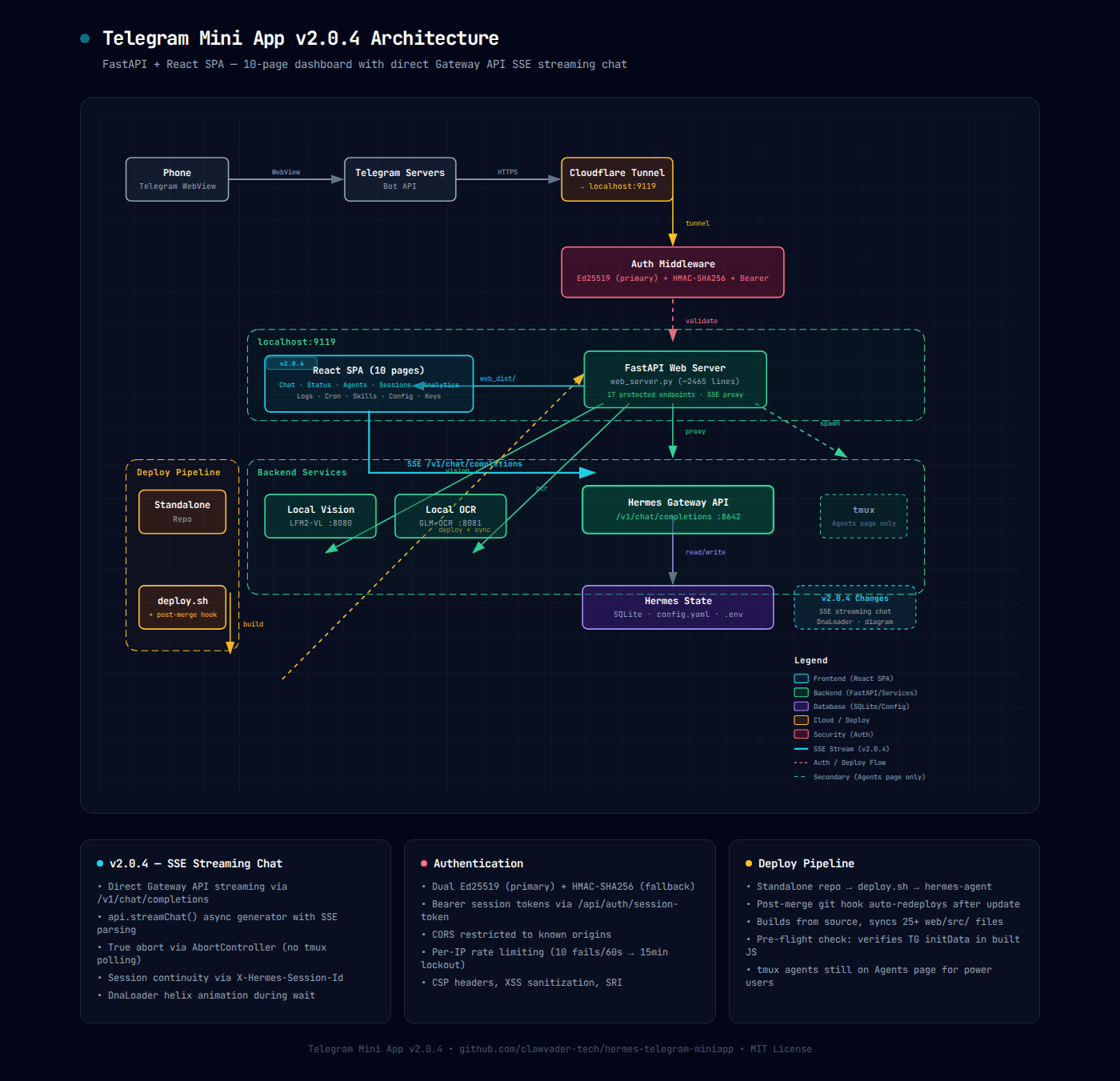
Architecture diagram — v2.0.4 SSE streaming flow

Click for the interactive SVG version

Contributing

Found a bug? Have an idea? PRs are welcome on GitHub.

📜
MIT License. Use it, fork it, ship it. The gateway-side auth changes live in the Hermes Agent repo.